Pro features Pro
The magazine features that come with ProMax Pro, and how to set each one up.
Everything on this page needs ProMax Pro. Pro also adds more post layouts, colour schemes and colour controls.
Homepage slider
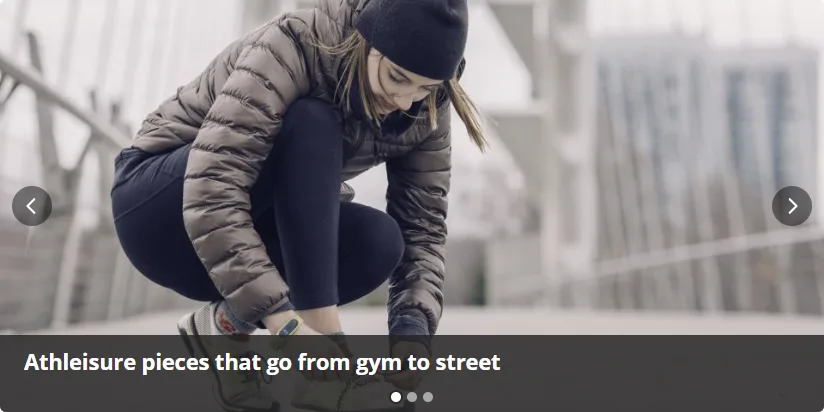
A lightweight slider with up to 4 slides, shown above the posts on the blog home page (the first page only).
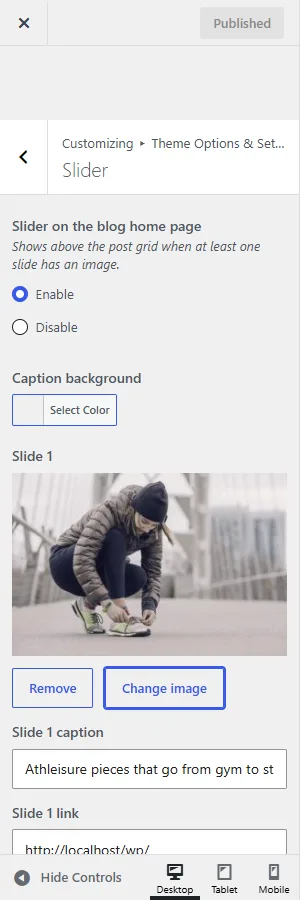
- Go to Customize › Theme Options & Settings › Slider.
- For each slide, choose an image (1200×600 recommended, you can crop any image), type a caption and paste a link.
- Optionally set the caption background colour. Publish.
- Slides change on their own, and pause while the mouse is over the slider or it has keyboard focus.
- Visitors can swipe, use the arrows and dots, or use the arrow keys.
- Visitors who ask their device for reduced motion get no automatic sliding.
- The first image loads with high priority for a fast first paint; the rest load lazily.
News ticker

A breaking-news bar below the menus that cycles through your latest headlines every few seconds.
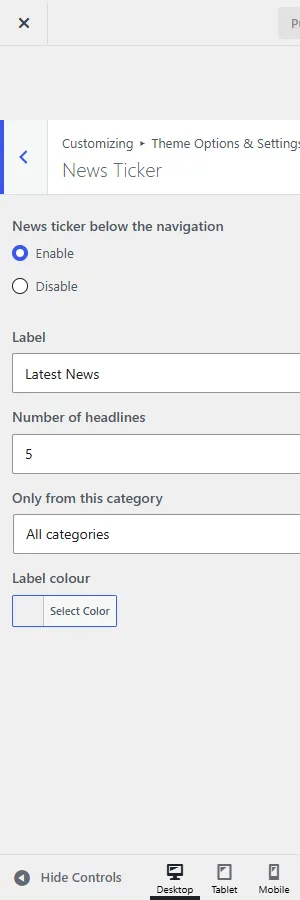
- Settings in Theme Options & Settings › News Ticker: on/off, label text, number of headlines (1–15), one category only, label colour.
- Previous, pause and next buttons. It also pauses on hover and keyboard focus, and starts paused for visitors who prefer reduced motion.
- On phones long headlines end in an ellipsis and the pause button stays reachable.
YouTube video thumbnails
Show a playable YouTube video in a post's card instead of its featured image. Good for video reviews and vlogs.

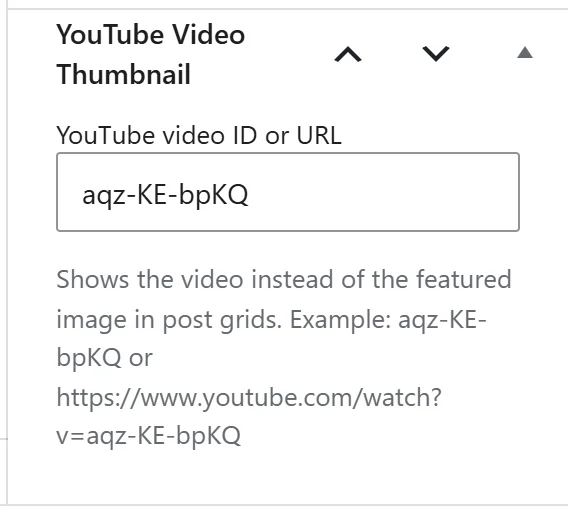
- Edit the post and find YouTube Video Thumbnail in the editor sidebar (Post tab, near the bottom).
- Paste the video ID (
aqz-KE-bpKQ) or the full URL (https://www.youtube.com/watch?v=aqz-KE-bpKQ). Shortyoutu.be, Shorts and live links work too. - Update the post.
The video appears in every post layout except Compact list. Videos load from youtube-nocookie.com and only when they scroll into view, so they don't slow the page down. Keep a featured image on the post too: it's used for sharing and in places that don't play video.
Share buttons

Turn on Theme Options & Settings › Post Settings › Share buttons below posts and pages. Networks: Facebook, X, LinkedIn, Pinterest, WhatsApp, Telegram, Reddit, Tumblr, VK and Email, plus a Print button. Links open the network's own share page, so no tracking scripts load on your site. Share buttons don't show on WooCommerce pages.
Google Fonts
Pick separate fonts for titles and body text from 63 fonts in Customize › Google Fonts. Open Sans is bundled with the theme; other fonts load from Google in one request. Turn Google Fonts off to never contact Google (useful for GDPR-strict sites). Font sizes for titles and body text are in Colors & Design.
Show or hide post details
In Theme Options & Settings › Post Settings switch each of these on or off: category badges and the date/author stamp on cards, excerpts and their length, a placeholder image for posts without one, the featured image on single posts, breadcrumbs, the date and author line, categories, comment count, tags, the author box and next/previous links. See all Post Settings.
Layouts per post and page
Set right sidebar, left sidebar or full width for the whole site, and override it on any post or page with the Layout box. See Sidebar position.
Back-to-top button
A round button appears in the bottom corner once visitors scroll down, and takes them back to the top. Turn it off in Theme Options & Settings › General Settings.
Phone and tablet options
In Theme Options & Settings › Mobile: rename the two menu buttons, add a search button to the main bar, and hide the sidebar or the latest posts strip on small screens to get readers to your content faster.
Automatic updates
ProMax Pro checks insertcart.com for new versions. When one is out, it appears in Dashboard › Updates and Appearance › Themes; click Update as usual. Your settings are kept.
Dashboard extras
- Appearance › More Themes lists other InsertCart themes.
- An InsertCart WordPress Tutorials box on the Dashboard links to the latest tutorials. Hide it from Screen Options at the top of the Dashboard.
- A dismissible notice suggests optional plugins: Regenerate Thumbnails, Menu Icons and Shortcodes Ultimate.